Windows Hello stopped saying hello (hint: a preview update)
Sep 28, 2026
My fingerprint reader had worked for ages. Touch the sensor, sign in, get on with things. Until around September 25, when that last part stopped happening.
I had an obvious suspect: a work account I had accidentally connected earlier that month. Surely some leftover policy was messing with Windows Hello?
Turns out… that was a pretty convincing rabbit hole.
TL;DR
On my Windows 11 machine, uninstalling KB5124010 / build 26100.9550 restored fingerprint functionality. Because I had already reset the Windows Hello credential state during troubleshooting, I then had to create a fresh PIN and re-enroll my fingerprint to get normal sign-in back.
That is what worked on this device. It does not establish a general Windows Hello bug in this update, but hopefully the investigation saves someone a few detours.
First suspect: the work account
The accidental work account had already been removed. The registration log even showed a successful workplace unjoin. My normal Promicro account was still connected, as it should be.
There were no relevant classic Group Policy settings in gpresult, and no obvious Windows Hello for Business policy keys in the registry locations we checked. That didn’t prove every possible management setting was innocent, but the account theory wasn’t getting much support.
The Promicro account stayed connected throughout the eventual fix. No need to disconnect a perfectly good work account just because it happens to be there.
Then I gave myself a second problem
Rolling back the fingerprint driver didn’t help. Resetting the local Windows Hello NGC state didn’t fix it either. NGC is the credential state Hello uses; resetting it meant I now needed to set up Hello again.
Except PIN setup failed too. Nice.
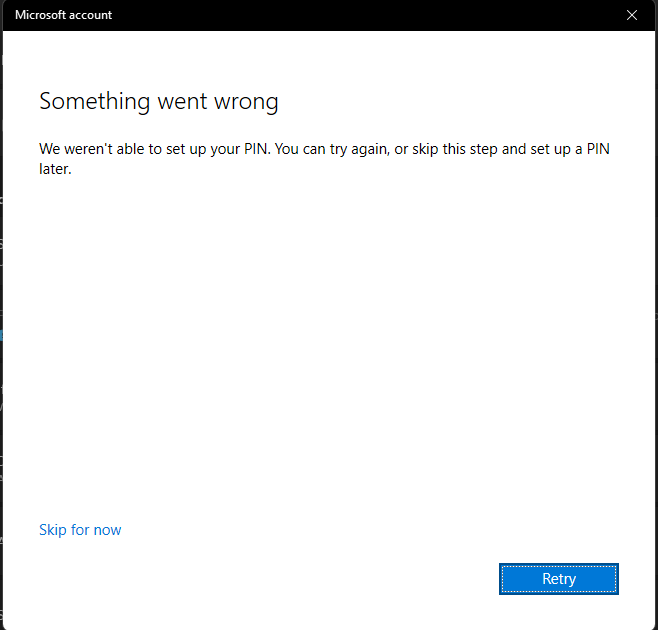
The detailed error was 0x800706d9, accompanied by:
We can’t connect to the server to set up your PIN right now.
I also saw a new six-character minimum for the PIN. Tempting evidence for the policy theory, but I never established what caused that requirement.
The useful clue was in Event Viewer > Applications and Services Logs > Microsoft > Windows > User Device Registration > Admin. NGC key registration and container creation were failing with:
There are no more endpoints available from the endpoint mapper.
Meanwhile, the token broker successfully obtained a token for my work account. Authentication was working at that stage; the failure came later, while provisioning Hello.
An error code is a clue, not a diagnosis
The endpoint-mapper error pointed us towards RPC and firewall checks. But the services were running, including RPC, the RPC Endpoint Mapper, Windows Firewall and the Base Filtering Engine. The relevant Hello services were running when checked too.
This local check succeeded:
Test-NetConnection localhost -Port 135
TcpTestSucceeded : True
That only checks connectivity to that port, not every RPC operation Hello needs. Still, together with the service checks, it made a simple stopped-service explanation much less convincing. The firewall was enabled on all profiles, and its rule store could be read successfully.
The other checks told a similar story:
- TPM: version 2.0, not locked out, hardware key storage and successful key/protector creation during the attempts.
- Account components: the AAD broker and AccountsControl packages reported
Status Ok, consistent with the successful token acquisition. - Windows component store: DISM found no corruption.
SFC did find and repair two files: rndismp6.sys and usb80236.sys. Finally, something broken!
Except those were USB/network RNDIS drivers, with no obvious connection to fingerprint sign-in. A reboot after the repair changed nothing.
A repair tool finding something doesn’t mean it found the thing. Annoying, but useful to remember.
The boring question that helped: what changed?
The first confirmed fingerprint failure was around September 25. Looking at recently installed Windows packages put a change right before it.
You can inspect that timeline from an elevated PowerShell session:
Get-WindowsPackage -Online |
    Sort-Object InstallTime -Descending |
    Select-Object -First 20 PackageName,ReleaseType,PackageState,InstallTime |
    Format-Table -Auto
On my machine, the relevant entries were:
| Installed | Package | Build |
|---|---|---|
| September 23, 11:32 | Servicing stack | 26100.9539 |
| September 24, 06:47 | Cumulative update | 26100.9550 |
| Around September 25 | Fingerprint sign-in failure first noticed |
Microsoft’s release notes for KB5124010 identify it as the September 22 preview update, producing build 26100.9550 on Windows 11 24H2. They also identify the included servicing stack as KB5124009, build 26100.9539.
There were lots of component packages with similar timestamps. Those weren’t dozens of separate updates to chase; they were serviced alongside the cumulative update.
Now there was a specific change to test.
The fix: rollback, then rebuild Hello
I uninstalled KB5124010 and rebooted. The fingerprint reader worked again.
Well… almost. It recognized my finger, then still asked for a PIN. Remember that NGC reset? The update rollback had restored the fingerprint path, but it couldn’t bring back the Hello credential state I had reset earlier.
The recovery sequence was:
- Open Settings > Windows Update > Update history > Uninstall updates, select KB5124010, uninstall it and reboot.
- Under Settings > Accounts > Sign-in options, provision a fresh Windows Hello PIN.
- Check the Hello state with
dsregcmd /status, run as the signed-in user. - Remove and re-enroll the fingerprint under Sign-in options, then test sign-in again.
During troubleshooting, the relevant status had been:
NgcSet : NO
After successfully creating the new PIN:
NgcSet : YES
WorkplaceJoined : YES
WorkAccountCount : 1
Hello was provisioned again, and my legitimate work account was still connected. After re-enrolling the fingerprint, normal fingerprint login finally worked. Touch sensor, sign in. Job done.
If you’re comparing this with your own machine, check the installed update and timing first, and make sure you have a working alternative sign-in method before changing Hello credentials. The PIN rebuild was necessary here because of my earlier reset; it isn’t a reason to reset everyone’s NGC folder. Treat rolling back an update as a troubleshooting step, and keep an eye on subsequent fixes rather than leaving Windows updates disabled.
What I’d take away from this
The timing and successful rollback strongly point to KB5124010 on my device. I haven’t identified the internal component responsible, or established whether other fingerprint readers are affected.
The checks weren’t wasted: they made a stopped service, TPM lockout, obvious policy or failed token acquisition less likely. But I would bring the update timeline into the investigation earlier next time. And keep track of the changes made while troubleshooting, because those can leave their own repair work behind.
Did you run into Windows Hello error 0x800706d9 or fingerprint trouble after this update too? I’d love to compare notes.
C:\Users\Tonie> cd..